Due this month
Loading this month's due dates…
🎁 FREE 🎉 Happy Totaling — free TallyPrime add-on. Total selected rows in one keypress. Download free →
🎁 FREE 🎉 Receivables & Payables Ageing — two free TallyPrime add-ons. See who owes you, and who you owe. Download free →
🎁 FREE 🎉 GST 180-Day ITC (Rule 37) — free TallyPrime add-on. Reverse the right ITC before the 180-day clock costs you. Download free →
🎁 FREE 🎉 Clause 44 of Form 3CD — free TallyPrime add-on. The tax-audit expenditure box, filled from your own vouchers. Download free →
🎁 FREE 🎉 Compliance Calendar 2026-27 — every GST, TDS and ROC due date, with free email reminders. Open free →
Two free Chartford add-ons for TallyPrime

Receivables & Payables Ageing Suite

See who owes you — and who you owe.

Party-wise ageing for customers and suppliers, live inside TallyPrime. No Excel export, no manual ageing.

or scroll down to download both add-ons ↓

TallyPrime 7.1 & 7.0 · installs in 2 minutes · read-only · your data never leaves your computer

The money you are owed is hiding in your ledgers

Every business knows its total receivables. Very few can say, in ten seconds, which customers are overdue, by how many days, and which bills are the oldest. That information is already in Tally — it is just spread across ledgers and buried under a report that was never built to chase money.

Overdue Radar turns those ledgers into a single, sortable view of overdue receivables, so a follow-up call is a two-minute job instead of a spreadsheet afternoon.

See it working

A 1:40 walkthrough of both reports — ageing, Schedule III, MSME classification and the advance knock-off finder. It starts muted (browsers require that to auto-play) — turn sound on any time. Every figure shown is sample data.

What the reports look like

Five screens, one per job. They rotate on their own — hover (or tap) any screen to see it full size.
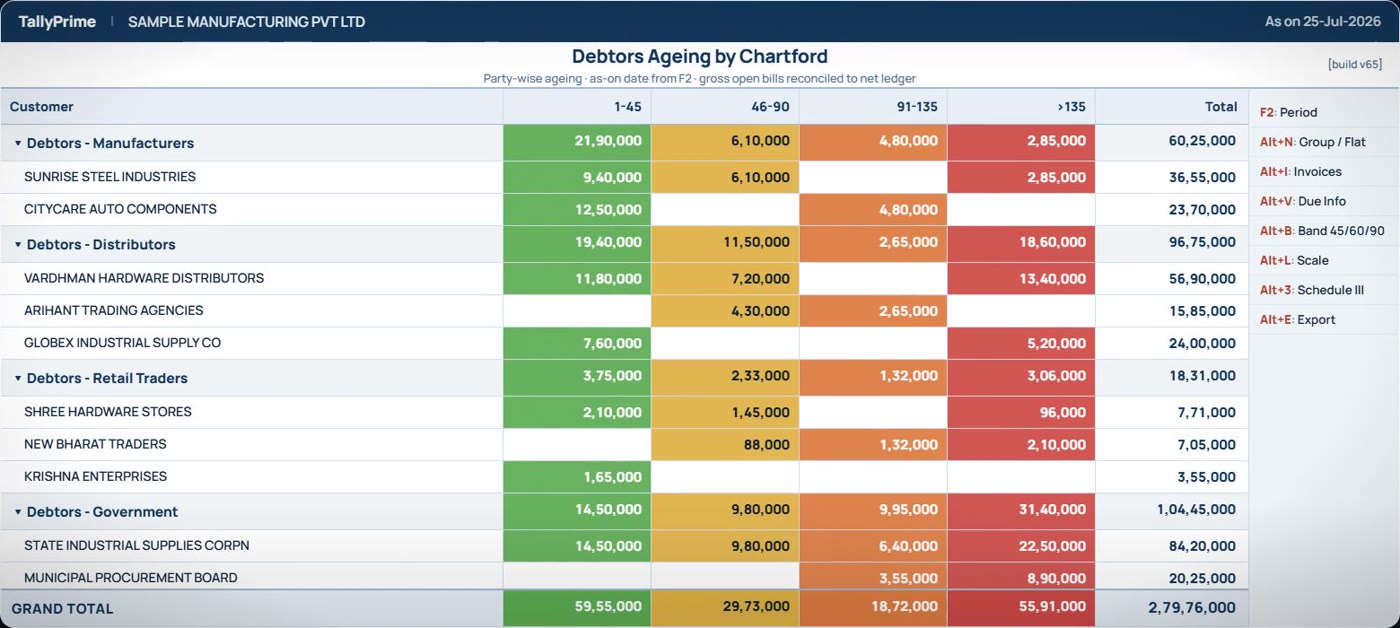
Debtors Ageing by Chartford: customers grouped and aged across four overdue buckets inside TallyPrime
Debtors Ageing — every customer aged across four overdue buckets, grouped the way your books already are.
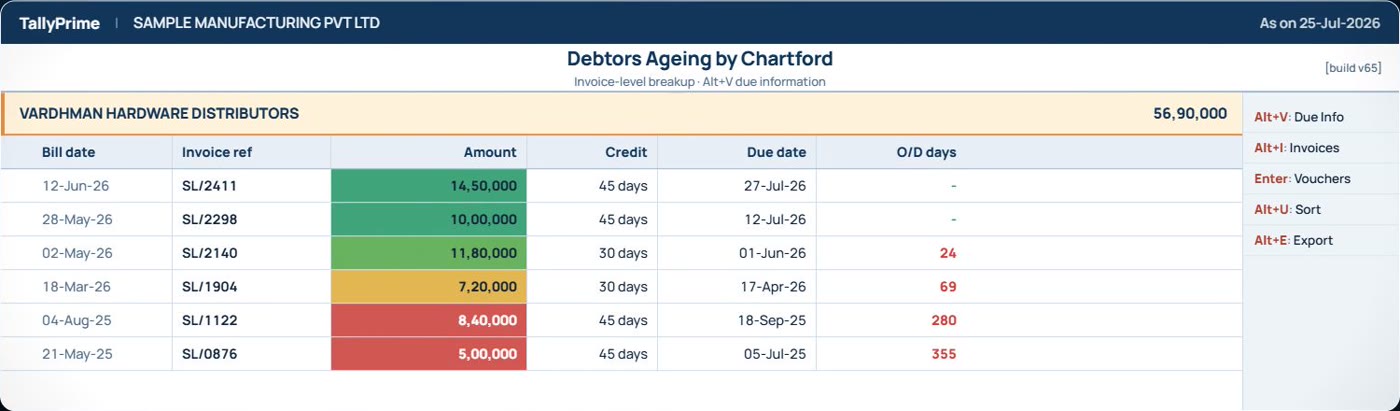
Invoice-level breakup showing bill date, invoice reference, credit period, due date and days overdue
Invoice drill-down — Shift+Enter on a customer opens every open bill with its credit period, due date and days overdue.
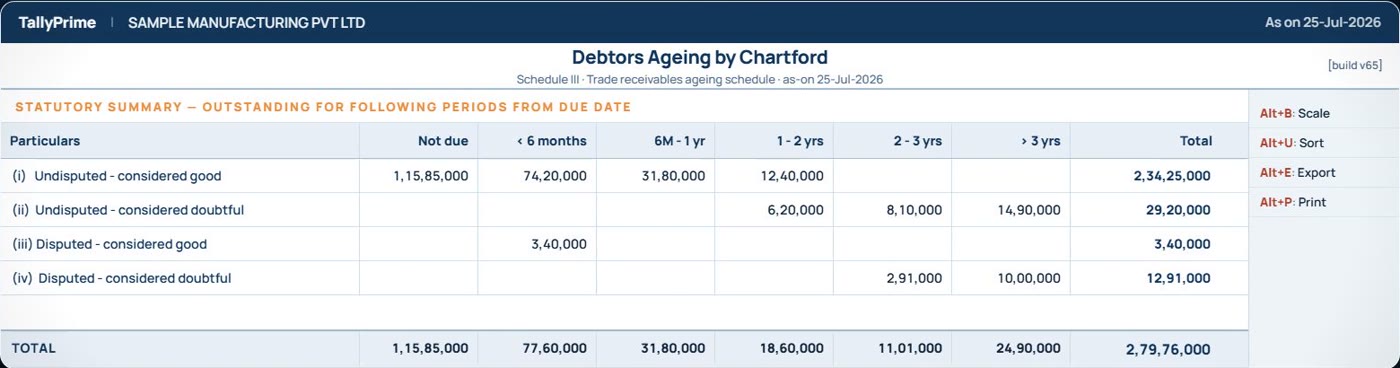
Schedule III trade receivables ageing schedule in the MCA four-category format
Schedule III — the MCA ageing note in the statutory format, ready for the auditor. Alt+3.
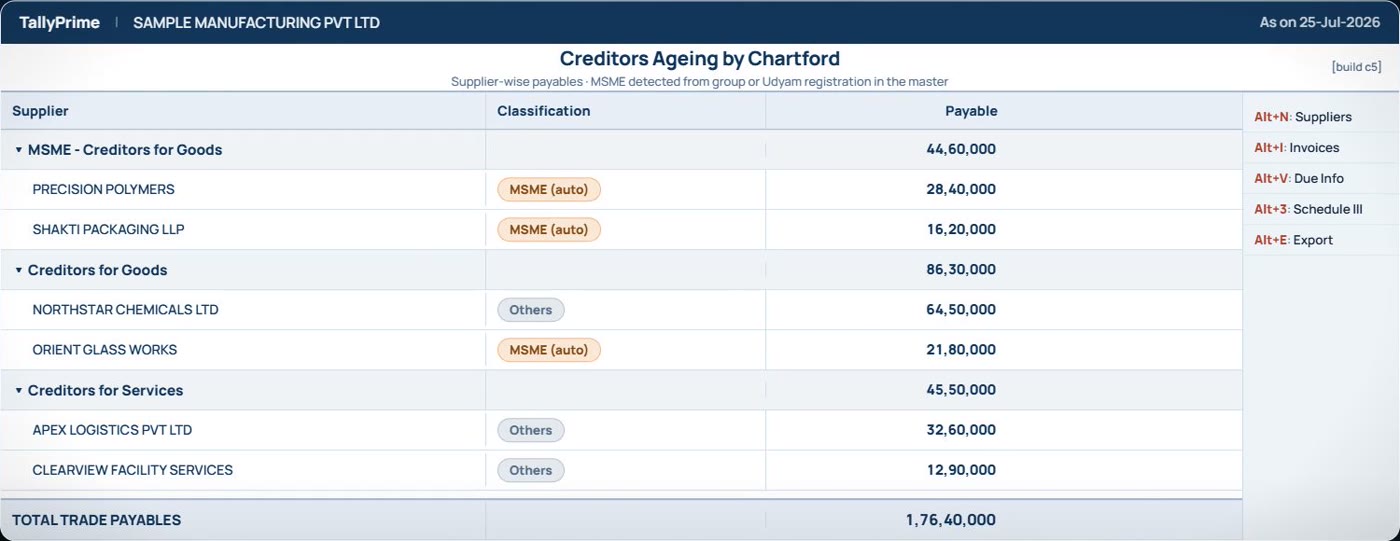
Creditors Ageing by Chartford with MSME suppliers flagged automatically
Creditors Ageing — MSME suppliers flagged automatically from the group or the Udyam number in the master.
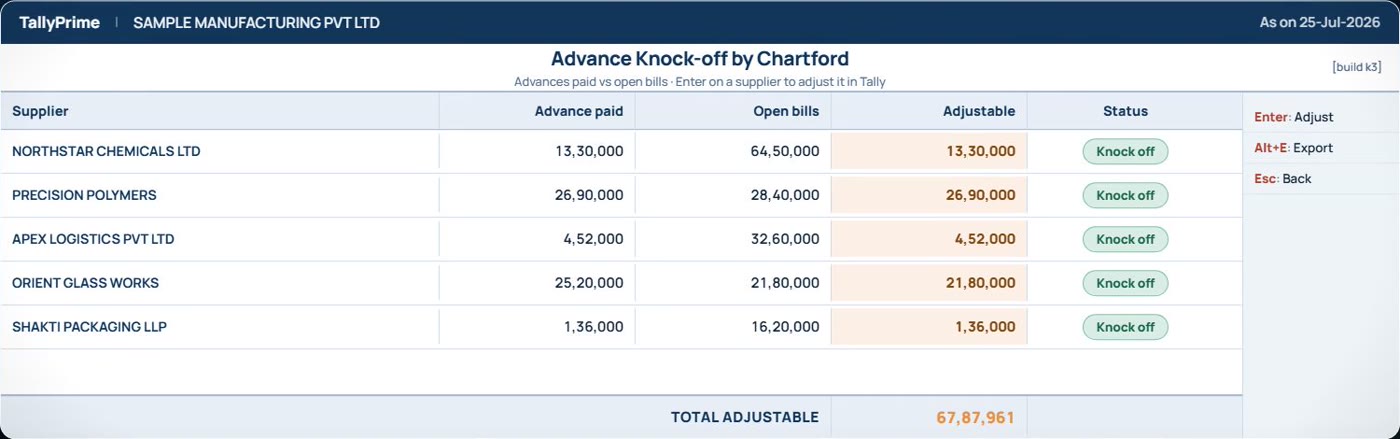
Advance knock-off finder listing advances paid against open supplier bills
Advance knock-off — every advance you already paid, matched against that supplier’s open bills.

Screens from a demo company. No real customer, supplier or balance is shown anywhere.

What you get

📊

Party-wise ageing

Every customer, bucketed by how overdue they are — current, 30, 60, 90, 90+ days — at a glance.

🔍

Bill-level drill-down

Open any party to see the exact invoices behind the balance, oldest first, so you chase the right bill.

↕️

Sort & find instantly

Sort by amount or by days overdue, and jump to any party with a find box — no scrolling.

🧩

Inside Tally

It is a report in your own TallyPrime, on your own data. Nothing is uploaded anywhere.

📄

Schedule III ready

Group receivables the way your financials need them, straight from the same screen.

Two-minute install

Load one file into TallyPrime and the report appears. No migration, no setup project.

How it works

  1. Tell us where to send it. Your name, firm and TallyPrime release — we email you the files, free.
  2. Load it into TallyPrime. Help → TDLs & Add-Ons, point it at the file, and open the report from the menu.
  3. See your overdues. The radar is populated from your own company data the moment it opens.
  4. Keep it. It’s free and it doesn’t expire — nothing to buy, nothing to activate.

Get it free

Tell us where to send it — no payment, no card, nothing to expire. We email you the files with install steps, usually within one business day.

What it costs

₹999 ₹0
Launch price was ₹999 — now free for everyone
no licence fee · no expiry · yours to keep
  • Full Overdue Radar report for TallyPrime 7.1 / 7.0
  • No serial lock and no activation — install it anywhere, share it freely
  • Setup help over WhatsApp or a call
  • Your data stays on your computer — nothing is uploaded

Free for everyone — no licence fee and no renewal. Setup help over WhatsApp or a call is included.

Common questions

Which TallyPrime versions does it work on?TallyPrime 7.1 is fully supported and 7.0 works as well. Older 6.x is best-effort — tell us your release and we will confirm.
Does my data leave my computer?No. Overdue Radar is a report that runs inside your own TallyPrime on your own company data. Nothing is uploaded to us or anyone else.
Can I share the file with a friend?Yes, please do. There is no serial lock and no time limit, so you can pass it to colleagues, your accountant or your clients.
Is it really free? What’s the catch?No catch. There is no licence fee, no trial clock and no activation key. We ask for your email so we can send the files, check in once the next day to ask if it worked, and tell you if a version update ships. Nothing else, and one-click unsubscribe. We build these because they bring the right people to Chartford.
What exactly do I get?Two add-ons: Debtors Ageing (receivables ageing + Schedule III) and Creditors Ageing (payables, MSME auto-detection, and an advance knock-off finder). Load both — they appear together under Gateway → Chartford.